Node.js 部署至 IIS 站台
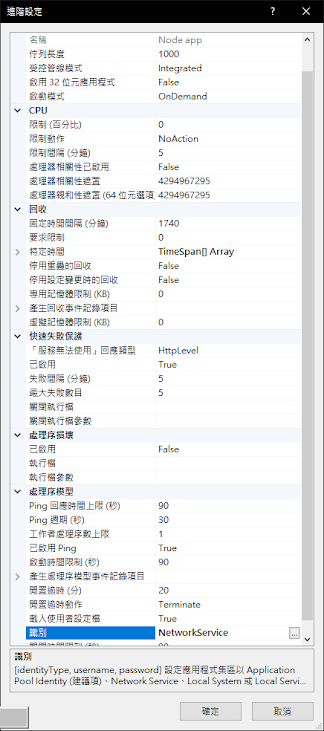
基於公司網路架構的規定 記錄一下自己是如何成功將手邊的 Node.js 部署到 iis 上。 一、安裝工具 以下三樣,順序固定 .安裝 node-v14.17.5-x64.msi 的node工具 https://drive.google.com/file/d/1oMVvy0p4ViP7v-EMA8vPqIghy_ulW_Af/view?usp=sharing .安裝 iis 的 rewrite_amd64_en.US.msi https://drive.google.com/file/d/1O1J-NuiGpNywGesuqCeSEcFSfjKluFzN/view?usp=sharing .安裝 iisnode-full-v0.2.21-x64.msi https://drive.google.com/file/d/1ijIW1Zz4rXrkW8F-aJQ5AA4vDromFfog/view?usp=sharing 二、建立IIS站 .首先建立「應用程式集」 -識別:NetworkService 三、建立 web.config .兩個方式 -自己為站台的情形,貼上以下內容 <configuration> <system.webServer> <!-- indicates that the server.js file is a node.js application to be handled by the iisnode module --> <handlers> <add name="iisnode" path="server.js" verb="*" modules="iisnode" /> </handlers> <rewrite> <rules> <rule name="sendToNode"> <match url="/*" /> <action type="Rewrite" url="server.js" /> </rule...